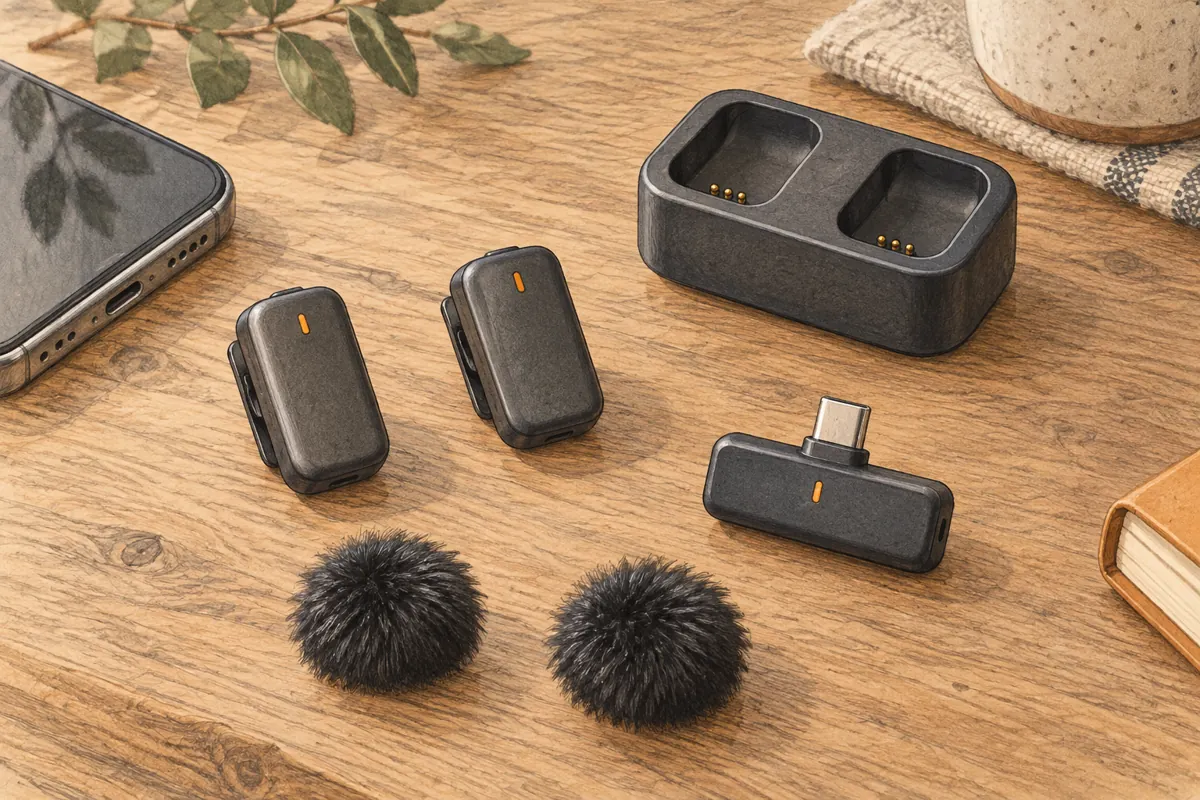
A wireless microphone should get out of the way. Clip it on, check the sound, and speak. That is the appeal of the Hollyland Lark A1 Mini Duo wireless microphone. It puts two small transmitters and a phone receiver in a kit you can carry with little fuss.
I would put it on a short list for a creator who films at home or interviews one guest nearby. I would be more cautious about using it for a paid event that cannot be repeated. The price and size appeal to me. But the phone, app, room, and wireless link still matter.
| Feature | What it means for you |
|---|---|
| Two transmitters | One wireless microphone for each speaker |
| USB-C or Lightning receiver | Buy the version that fits your phone |
| Charging dock | Needs a power source to refill the transmitters |
| Up to 9 hours per transmitter | Hollyland's figure with noise cancellation off |
| Three noise settings | Start low and listen for changes to your voice |
| 200 m advertised range | A clear line-of-sight claim, not a promise in a crowd |
The Mini Duo name matters more than the color
The Lark A1 product family includes several bundles. Some have a charging case. The Mini Duo has a charging dock. That changes how you use the kit away from a wall socket.
The official Lark A1 kit list shows two transmitters, a receiver, a dock, magnets, furry windshields, a carry bag, and a USB-A to USB-C cable for the Mini Duo. Check the seller's list of parts before you pay. A gray or space gray finish tells you little. Check which receiver and charging gear come in the box.
A dock is fine if you charge at your desk before each shoot. It is less handy if you want to drop the microphones into a powered case between stops. The carry bag protects loose parts from getting lost; it does not charge them.
My rule is to compare the included parts, not just the first product photo. A listing may show the full range while the selected item is the small kit. Check the receiver, quantity of transmitters, and dock again in the cart. Save the order details in case the wrong bundle arrives.
USB-C RX or Lightning: match the receiver to your phone
RX means receiver. The USB-C RX plugs into a USB-C port. The Lightning RX is made for a Lightning port. Pick the version for the phone you will use now. Do not assume a basic charging adapter will pass microphone audio between the two.
The USB-C receiver is small, but it still needs room around the port. A thick phone case may block the plug. A grip, cage, or tripod mount may also crowd that edge. Check the fit before you head out to record interviews.
USB-C on two mobile devices does not guarantee that both behave the same. Your app must use the plug-in mic. Make a test clip, tap each transmitter in turn, and play the file back. That shows which source the app used.
There is one specific catch worth knowing. Hollyland's support FAQ says Pixel 9 Pro XL and Pixel 10 Pro XL phones can switch to the built-in microphone when charging through the connected system. Its advice is to record without charging on those phones. I would test the receiver alone first. Then I would test phone charging as a new step.
If you use more than one phone for work, test each phone and app. A successful voice memo does not prove that a camera app or live streaming app uses the same input. This check takes less time than fixing a whole clip with distant sound.
What the small transmitters do well
Each transmitter weighs 8 grams, according to Hollyland. That suits a thin shirt. A heavy wireless microphone could pull the cloth down. A clip or magnet holds the microphone close to the voice while the phone stays farther away.
That distance is the main reason I would buy this kit. When a phone sits across a table, its microphone hears more room sound along with the voice. A wireless microphone on the chest closes that gap. It also lets two speakers move without sharing one mic on a stand.
The system supports 48 kHz, 24-bit audio. Those numbers tell you the audio format. They do not promise great sound. A collar rubbing the microphone can spoil a take at any bit depth. So can a scarf, necklace, or jacket zip that taps the shell.
Clip each transmitter where cloth will not brush it as the speaker turns. Ask for a few normal sentences and a laugh. Listen to the saved clip, not just the phone speaker in a loud room. Headphones make small scratches and bumps much easier to catch.
Noise reduction: use less than you think
The Lark A1 has three levels of noise cancellation. I would start with it off in a quiet room. If you need help with a steady fan or traffic bed, try the lowest level next.
Stronger noise reduction is not always better. It may make speech sound thin or cause the background to rise and fall between words. Listen to the ends of words and soft breaths. If they start to vanish, turn the setting down or move to a quieter spot.
A furry windshield helps with air hitting the microphone outdoors. It serves a different purpose from electronic noise reduction. Put it on before the wind picks up. Do not wait until the interview is over to check.
I would also leave reverb off for speech. The kit offers EQ and reverb controls, but most interviews need a clear, close voice. Extra room sound is hard to remove once it is part of the file.
For a room that rings on every sentence, the wireless microphone is only part of the answer. Our guide to acoustic panels explains how to reduce echo at the source.
Battery life: do not apply the 54-hour claim to this dock
Hollyland lists up to nine hours per transmitter with noise cancellation off, or 6.5 hours with it on. Treat those as maker figures. Leave room for setup, retakes, and the fact that batteries age.
The larger 54-hour claim uses a charging case. It swaps between the two transmitters. It is not 54 hours of two-person recording on one charge. It is also not what a Mini Duo dock gives you by itself.
That suits planned shoots. It is less useful on days with no place to charge. The dock needs a cable and power to charge the mics. Pack both if you need to charge between shoots.
Keep the contacts clean. Let damp gear dry before charging. Check both transmitters before a shoot. Do this even if you only used one last time. A two-mic system is only as ready as its least-charged mic.
Range, reviews, and the limits of a small wireless system
The stated transmission range is up to 200 meters, or about 650 feet, in clear line of sight. I would not plan an interview around that number. Walls, bodies, busy wireless spaces, and the way you hold a phone can all affect the link.
In one Lark A1 Mini Duo discussion, a user reports useful results for social clips in treated rooms and at events. Other replies question whether gear at this price suits professional location work. Those reviews point to different needs, rather than one verdict that fits everyone.
I take a modest lesson from that split: keep the receiver close for casual work, and test at the real location. Talk as you walk a short route. Turn your body away from the phone. Play the recording back and listen for gaps.
Do not assume this system gives you a separate safety file inside each transmitter. Plan your backup around the recording devices you have confirmed. If losing one answer would ruin the job, a low-cost wireless microphone should not be your only plan.
A short check before you press record
- Charge both transmitters in the dock.
- Connect the correct receiver with the phone case out of the way.
- Open the app you will use for the actual recording.
- Clip one wireless microphone on each person and check for cloth rub.
- Record a short clip with both voices. Check levels, noise, and the saved file.
- Repeat the check if you switch apps or add phone charging.
If the level is low, check the kit's gain setting and the app's input first. Do not turn every control up at once. One small change, then a new clip, makes the cause easier to find.
Would I buy the Lark A1 Mini Duo?
For short, nearby phone interviews, yes, provided the right receiver works with the intended phone and app. Two light microphones, simple phone connection, and a compact dock are a useful set of basics.
I would pass if the job demands long days with no charging point, a camera connection the chosen kit does not provide, or a verified backup recording in each transmitter. Those are core needs.
For a show that stays at a desk, I would start with wired podcast equipment instead. For a creator who needs to move, the Hollyland Lark A1 Mini Duo wireless microphone is worth a look. Just buy the kit named in the listing, not the larger kit implied by a headline claim.